 code
codeInput and Voice
On this page
TypingSelecting and copyingZero-lag local echoCJK inputVoice dictationRead My MindProgrammatic inputGotchasRead nextGetting words into an agent: typing, dictating, and letting Codeman guess. Plus the input machinery that only shows up when it goes wrong.
Typing
Click into the terminal and type. It is a real terminal, so everything the CLI supports works, slash commands included.
| Key | Effect |
|---|---|
Enter |
Send. |
Shift+Enter / Ctrl+Enter |
Newline without sending. |
Ctrl+C |
Copy if text is selected, otherwise interrupt. |
Ctrl+Shift+C |
Copy, never interrupts. |
Ctrl+V |
Paste. A clipboard image uploads instead. |
Ctrl+L |
Clear the terminal. |
Exactly-once delivery
Browser input goes through a durable layer rather than a plain socket write. Each prompt carries a stable client id and a per-session sequence number, held in local storage until the server acknowledges it.
The result is the property you want on a phone: a connection that drops mid-prompt never loses the prompt and never delivers it twice. Two browser tabs on the same session coexist, and only a reconnect from the same tab supersedes the old connection.
Selecting and copying
Agent CLIs hold the mouse: clicks and drags are reported into the transcript rather than
selecting text. Shift+drag starts a selection anyway, right-click copies it (with nothing
selected the native context menu is left alone), and Ctrl+Shift+C copies without ever
interrupting. Auto Copy Selection in App Settings → Terminal & Input, off by
default, copies the moment you release the mouse. On phones, long-press selects; see
Mobile Guide.
Zero-lag local echo
On touch devices, keystrokes are painted in the terminal immediately and sent when you press Enter, instead of waiting for each character to round-trip to the server and back. Over a mobile connection that is the difference between usable and not.
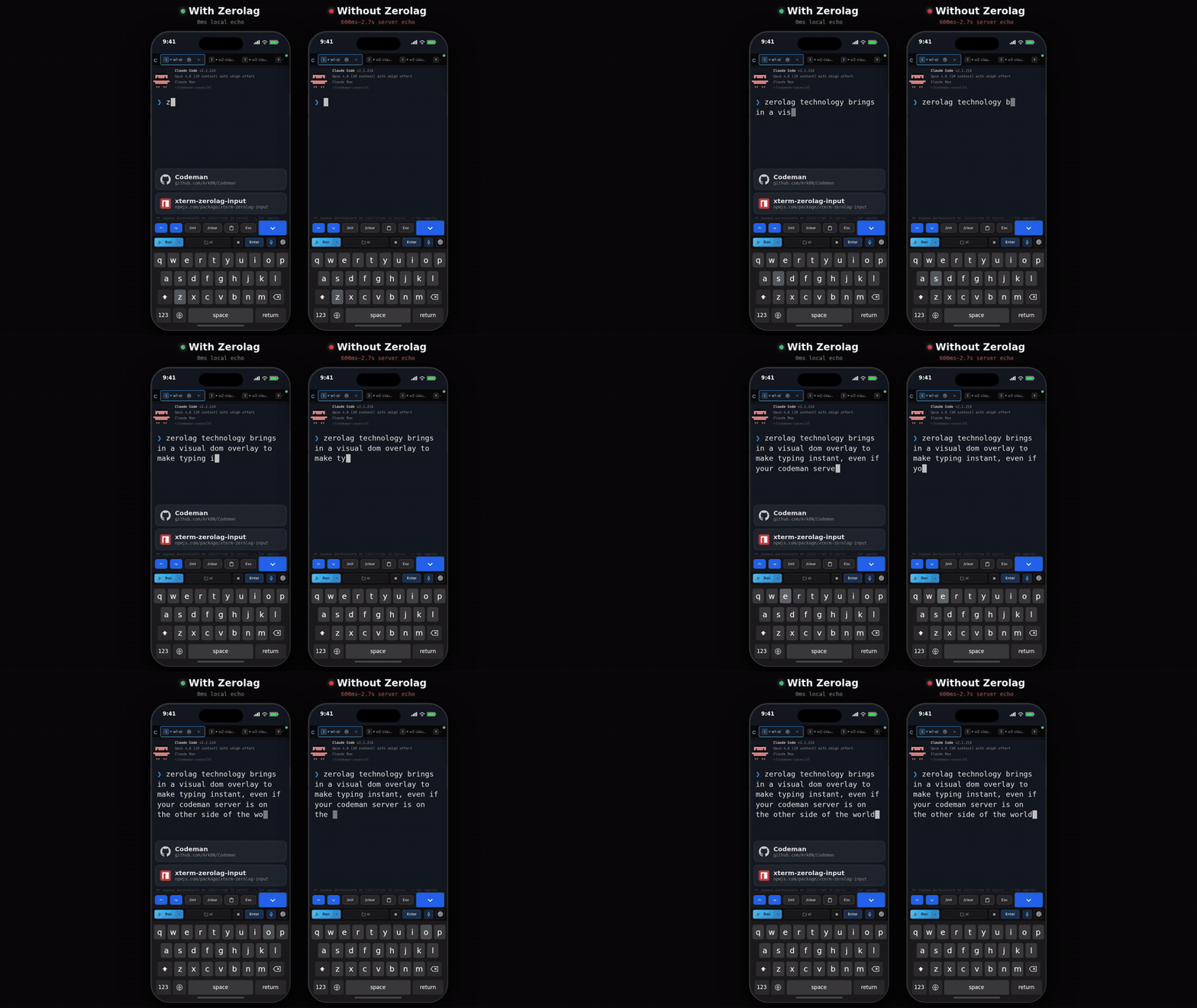
The consequence to remember: text on screen has not necessarily reached the agent yet. It is flushed on Enter. If a prompt appears to have been ignored, press Enter, or the phone toolbar's Enter button.
Default on for touch devices, off for desktop, and switchable in App Settings → Terminal & Input.
Codex is different on purpose
Codex's composer reacts to every keystroke: / opens a live-filtering picker, arrows edit
state on its side, the composer grows as text wraps. Buffering until Enter starved it, so
Codex sessions use predictive echo instead: each keystroke is painted at its predicted
position while the bytes actually sent stay identical to what you typed. Predictions
reconcile against the real buffer and only apply while the cursor is on the composer row.
CJK input
Chinese, Japanese, and Korean input needs an IME, and an IME needs a real text field. Turning on CJK input in App Settings → Terminal & Input puts an always-visible textarea below the terminal that owns composition, then delivers the composed text to the session. Ctrl- and Alt-modified navigation keys typed through it reach the CLI as the modified sequences, so word jumps and history keys keep working.
Voice dictation
Ctrl+Shift+V, or the microphone button. There are three providers and the default is
auto, which prefers them in this order:
| Provider | Needs | Notes |
|---|---|---|
| Claude | Claude Code logged in on the server. Opt-in. | Uses this machine's existing Claude login. No extra key. |
| Deepgram | A Deepgram API key. | Nova-3, with automatic silence detection. |
| Web Speech | Nothing. | Browser-provided, quality varies. |
Dictating through your Claude login
Off by default; enable it in App Settings → Voice.
Claude Code has its own voice mode, but it opens the host's microphone, and in Codeman the CLI runs headless in a tmux pane while you are in a browser somewhere else entirely. So Codeman captures audio in your browser and borrows only the backend: audio goes browser to Codeman to Anthropic, and the page never sees the OAuth token.
Two deliberate limits:
- Credentials are read only. Codeman never refreshes your Claude token, because a refresh rotates the refresh token and could sign you out of your own CLI. An expired token is reported as expired rather than silently renewed.
- Capture is raw PCM at 16 kHz mono, which requires an AudioWorklet rather than the usual browser recorder.
Read My Mind
Claude only, off by default. Turn it on in App Settings, and a 🧠 button appears in the header (on phones, in the keyboard bar instead).
It keeps a per-case intent profile: goals you or your agent write down, plus the prompts you actually submitted in that case. Pressing 🧠 feeds that profile plus live session signals to a single model call and shows a predicted next prompt.
What you can do with the result:
- Send it, Insert it into the composer, or edit it first.
- Pick one of the alternate suggestions, which swaps into the editable field without losing your edits.
- Rethink, optionally with a steer note, to reject the whole set and try again.
Nothing is ever sent automatically. Every path requires a click.
Where the data lives: the profile is keyed by owner and the resolved working directory, so
it survives /clear and respawns. Prompts can contain secrets, so the store is written
0600 and is deliberately excluded from cross-session search.
Guide: docs/readmymind.md.
Programmatic input
Sending prompts over the API has one rule that catches everyone: the payload must end with
\r or Enter is never sent. The request still succeeds, the text sits unsubmitted in the
composer, and any wait burns its whole timeout on a turn that never started.
Input is also single line. Embedded newlines are stripped rather than rejected, so
"echo A\necho B\r" runs the joined echo Aecho B. Put multi-line content in a file and
tell the agent to read it.
See Driving Codeman From An Agent.
Gotchas
- Typed text sitting on screen has not been sent. Press Enter.
Ctrl+Cwith a selection copies. Clear the selection to interrupt.- Voice needs HTTPS. Microphone access requires a secure context, same as push notifications.
- Read My Mind goes blind for sessions using a relocated Claude config directory, along with the other transcript-backed features. See Agent CLIs.
Read next
- Mobile Guide - the keyboard bar and touch input.
- Keyboard Shortcuts - the full list.
- Working With Files - images and attachments as input.
Edit this page on GitHub · last updated 2026-09-15